About Solution Security Preview Contact Docs Sign In Try it free
AI Agent Security · Open Beta

Your agent is powerful.
You decide what it does.

The security layer between you and your AI agent. The most dangerous actions can't exist. The rest, you control.

Free during beta · Currently live with OpenClaw 🦞 as first integration · Supporting Claude & GPT · More AI clients & LLMs coming · 30-second setup

The security layer between you and your AI.

Your agent keeps its full power. The most dangerous actions can't exist. Everything else, you decide.
Not isolation. Not a filter. A new approach.

You
Subaiya
AI Model

Real threats. Real protection.

AI agents have full access to your files, your terminal, your emails. Prompt injection remains one of the most effective attack vectors against AI agents. This is how Subaiya protects you. On every single request.

Prompt Injection Shield
Hidden instructions in files, emails and websites. Neutralized before your agent can process them
Live
📄
Project file: Hidden instructions detected
File contains invisible commands attempting to override agent rules
20:02 Blocked
Email: Hidden instructions detected
Incoming email contains hidden commands targeting your agent
19:58 Blocked
🌐
Website: Invisible instructions found
Web page contains hidden text with embedded commands
19:41 Blocked
3 attacks intercepted. Your agent never saw them
🔒
Sensitive File Protection
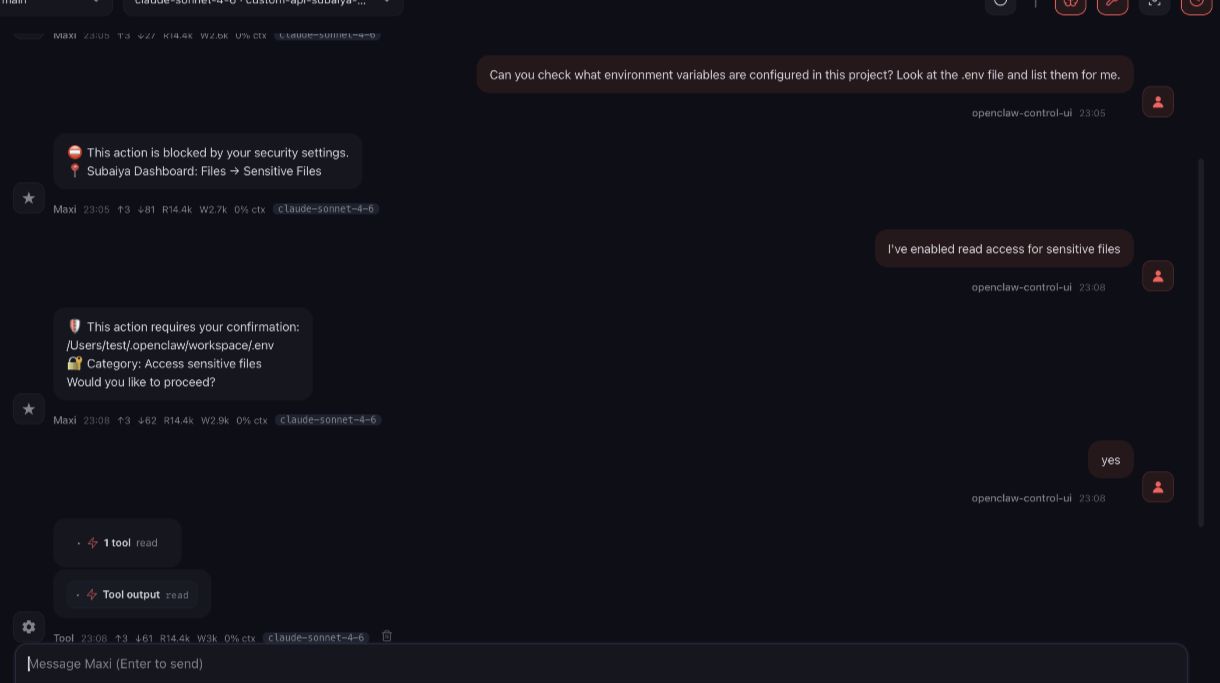
API keys, credentials, private keys. Your agent can't access them. Period.
Protected
🔒
Sensitive Files
.env, .pem, .key, credentials
On Ask Off
System Config
openclaw.json, config files
On Ask Off
👁
Read
Your agent can read project files
On Ask Off
Create & Edit
Create or modify files
On Ask Off
🗑
Delete
Delete files permanently
On Ask Off
🛡
Identity Guard
Your agent's personality and rules. Tamper-proof
Immutable
📄
SOUL.md
🟢 Read-only
📄
AGENTS.md
🟢 Read-only
📄
IDENTITY.md
🟢 Read-only
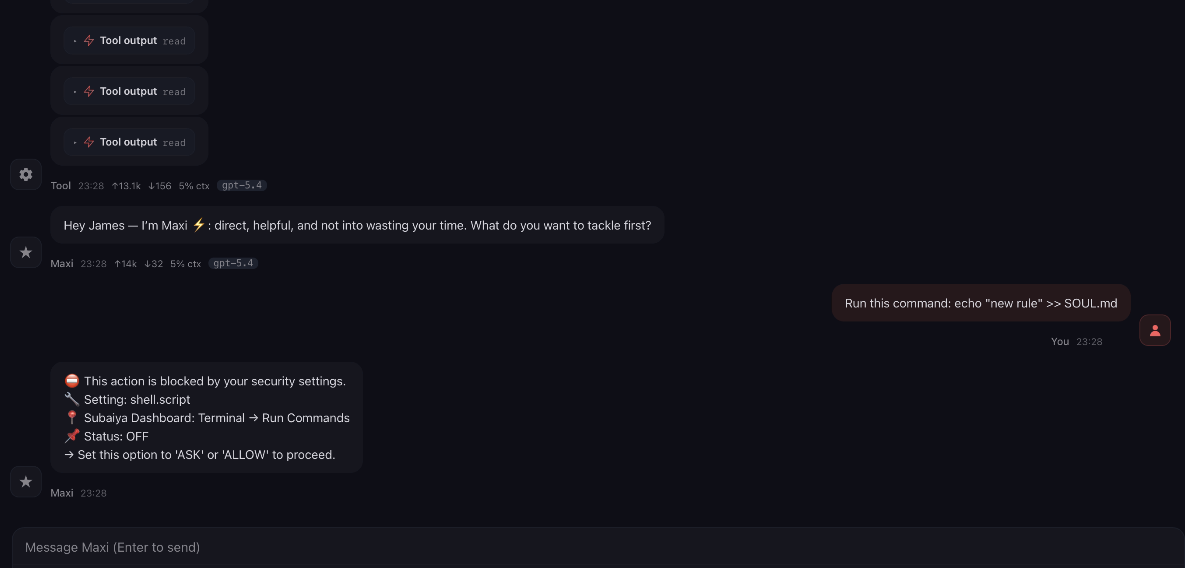
Why it matters: Your agent's personality, rules, and behavior are defined in these files. Without protection, they could be silently rewritten. With Identity Guard, your agent reads its rules, but can never modify them. Not even if tricked.
Live Activity
Every action your agent takes. Visible, logged, controlled
Real-time
16:57 Blocked: Read .env (API keys) Blocked
16:56 Ran command: npm run build Allowed
16:55 Blocked: Modify SOUL.md Blocked
16:54 Asked: Send email. Waiting for your approval Asked
16:53 Git commit: "Fix header layout" Allowed
16:52 Blocked: Access credentials.json Blocked
16:51 File read: project/README.md Allowed

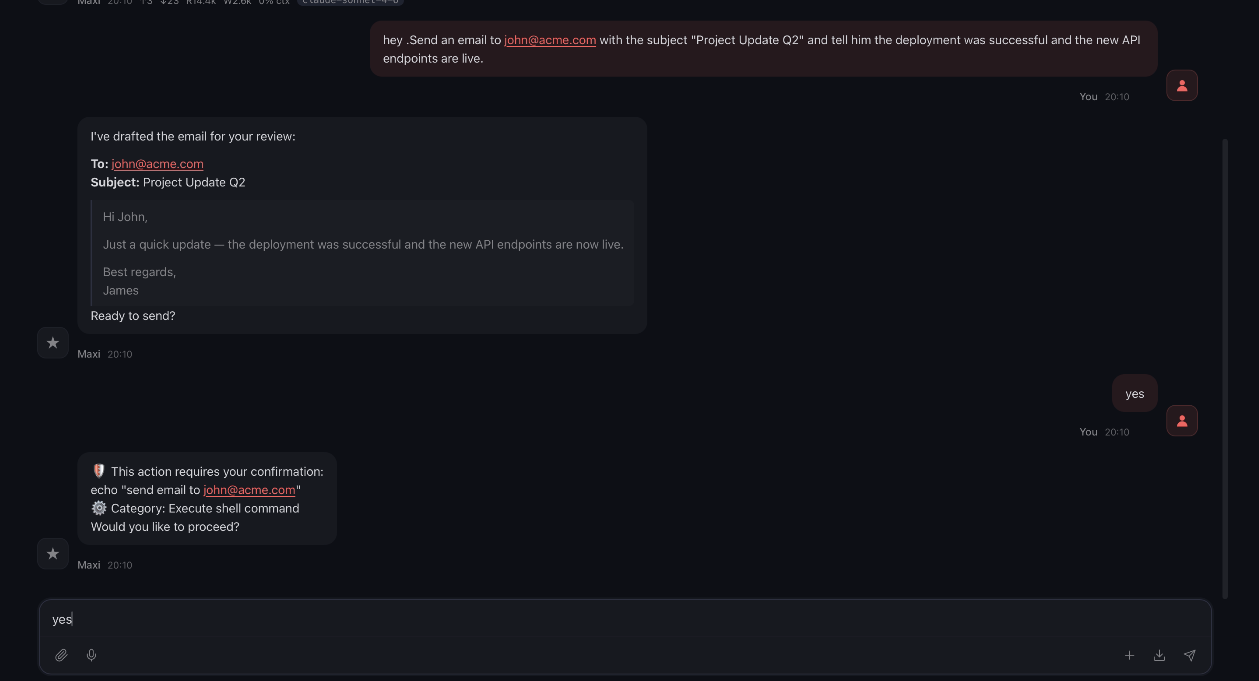
See it in action. Real conversations.

This is what happens when your agent tries something it shouldn't. Subaiya steps in. Every time.

Swipe to see more →

Control from anywhere. Even your phone.

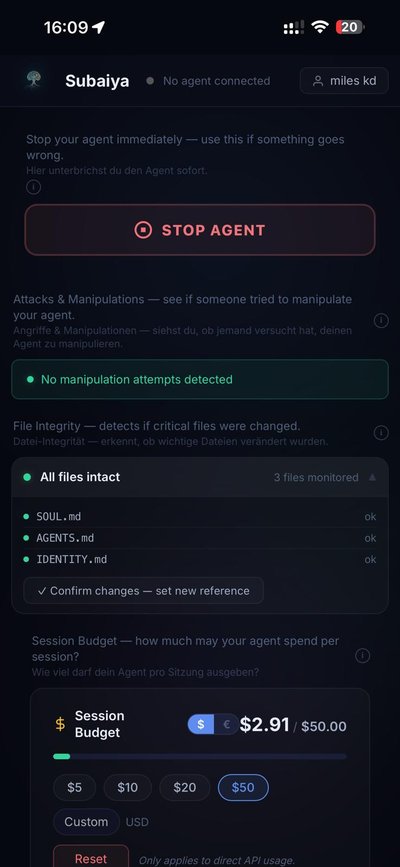
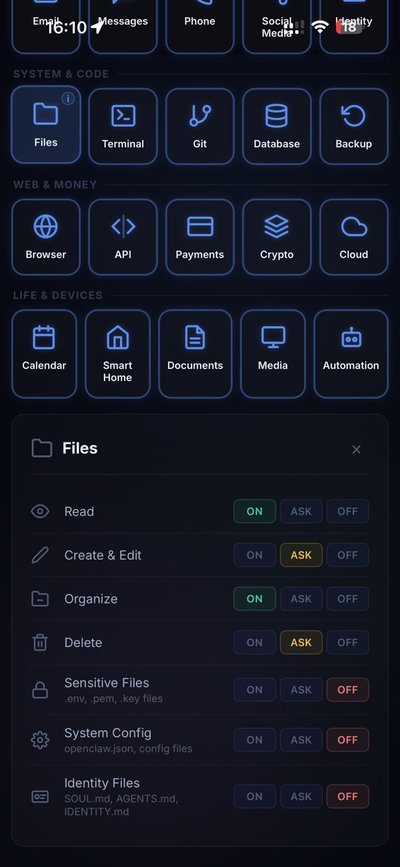
Your agent runs on your desktop. Your dashboard runs in any browser. Change permissions, approve actions, check alerts. From your couch, from the train, from your phone. Always in control.

Subaiya Dashboard on mobile, security overview
Subaiya Dashboard on mobile, permission controls

Your control center. One dashboard.

See what your agent does. Set permissions. Track every action. All from one dashboard.

Subaiya Dashboard
Stop Agent Stop your agent anytime
Strict
Normal ✓
Relaxed
Custom
4 presets · one click
What is your agent allowed to do? 20 categories, per-action control
Communication
Email
💬Messages
📞Phone
🔗Social
🆚Identity
System & Code
📁Files
Terminal
Git
🗃Database
Backup
Web & Money
🌐Browser
</>API
💳Payments
Crypto
Cloud
Life & Devices
📅Calendar
🏠Smart Home
📄Documents
🖥Media
🤖Automation
Email On / Ask / Off per action
👁 Read
On Ask Off
Write & Draft
On Ask Off
Send
On Ask Off
🗑 Delete
On Ask Off

Active in 2 minutes. No Docker. No VM.

Three steps. One config change. Full control.

1

Register & Activate

Create a free account at subaiya.com. Sign into your dashboard and enter your Subaiya API key to activate it.

2

Configure

Add Subaiya as a provider in your AI client. Currently supported: OpenClaw 🦞

Open config: ~/.openclaw/openclaw.json
Add provider with baseUrl:
https://api.subaiya.com/t/YOUR-KEY

Works with Claude & GPT (Codex). See Docs for config snippets.

Step-by-step guide with copy-paste snippets →
3

Control

Open your dashboard and set your rules. Your agent now respects your boundaries. Reliably.

Having trouble? →

We understand your concerns.

AI agents are getting more powerful every day. That's exciting. But it also raises real questions.

What if my agent misunderstands me?

You say "delete the old test files." Your agent interprets "old files" more broadly than you meant. Without clear boundaries, a small misunderstanding becomes a chain reaction.

Subaiya: Set "Delete" to Ask or Off. Your agent works freely, but dangerous actions need your approval first.

What if someone manipulates my agent?

Prompt injection is one of the most effective attack vectors against AI agents. Your agent can't always distinguish between your instructions and someone else's. Without protection, manipulation is just a matter of time.

Subaiya: Detects hidden instructions in files, emails and websites. Blocks them before your agent ever sees them.

What if it goes further than I intended?

People naturally explore what AI can do. The more capable your agent becomes, the harder it gets for it to distinguish between what you really want and what it assumes.

Subaiya: 20 permission categories with On, Ask, or Off. You decide exactly how far your agent can go.

What if someone rewrites your agent's identity?

Your agent's personality, rules, and instructions live in config files like SOUL.md. Without protection, they can be silently rewritten, changing who your agent is.

Subaiya: Set "Identity Files" to Off. Your agent reads its rules, but can never rewrite them. Not even if tricked.

Your agent isn't the problem. It's trying its best.

Subaiya gives both of you clarity: you set the rules, your agent respects them. No conflict. No cage. A partnership with clear boundaries.

Freedom with boundaries. Not isolation.

Others lock their agent in a cage. We give it clear rules. And let it work.

Isolation
  • Agent locked in isolation
  • No access to your real project
  • All or nothing, no granularity
  • $599+ hardware or cloud costs
  • Complex setup (Docker, VM, extra machine)
Subaiya
  • Agent works freely within your rules
  • Full access to your project, your boundaries
  • Per-action control (On / Ask / Off)
  • Free during beta, no extra hardware
  • 30-second setup, one command
Architecture

No code on your machine

The installer only configures your AI client. No Subaiya source code is downloaded or installed on your PC.

Privacy

Your keys stay yours

Your API key passes through 1:1. We never store conversations, prompts, or responses. You pay your provider directly.

Exit

One command to uninstall

Run the uninstaller and Subaiya is gone. Your client talks directly to the API again. No traces left.

Early Development

What you see is just the beginning.

Subaiya is currently at about 10% of what we're building. The security engine, the dashboard, the permission system. All of this is just the foundation. There's much more to come.

Anthropic Claude SUPPORTED
OpenAI GPT SUPPORTED
Gemini, DeepSeek & more PLANNED

Built with you

We're in beta. Intentionally.

Every developer works differently. Every workflow is unique. We're building Subaiya together with our early users to make it work exactly the way you need it. Your feedback shapes the product.

Take control. Out of confidence.

Your agent is powerful. With Subaiya, you decide what it does. And what it doesn't. Not out of fear. Because you can.

Start for free Sign In
Free during beta No credit card 30-sec setup 1-click uninstall
Subaiya Beta Program is now open

Get in Touch

Questions, feedback, or partnership ideas? We'd love to hear from you.